Novakrift Classic v1.2.0
(Shopify Online Store 2.0)
Audience: Shopify Merchants & Frontend Developers
Status: 100% Tested & Verified
Last Verified: October 31, 2026
Frictionless Slide-Out Cart Experience
Novakrift replaces disruptive full-page cart redirects with a sleek, slide-out Cart Drawer (sections/cart-drawer.liquid). Whenever a customer adds an item to their cart, the drawer slides smoothly from the right, providing an instantaneous summary of their shopping bag.
1. Multi-Tier Free Shipping Progress Bar
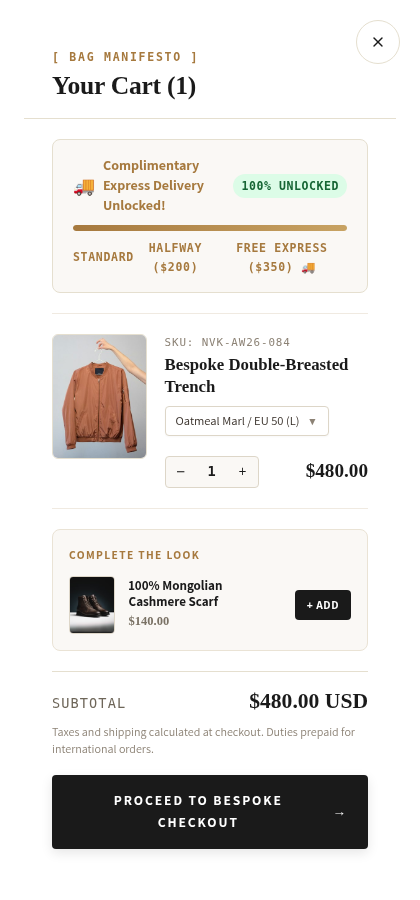
Motivates customers to add more items to their bag by displaying visual progress towards complimentary delivery:
- Three Milestones:
Standard Delivery(Cart subtotal < 50% of threshold).Halfway There!(Progress bar reaches 50%).Free Express Delivery Unlocked! 🚚(Cart subtotal ≥ threshold).
- International Market Conversion: Automatically converts shipping thresholds into the customer's local currency using active Shopify Markets exchange rates.
Step-by-Step Configuration Guide
- In Theme Customizer, open Theme settings (gear icon) → Cart.
- Set Cart type to Drawer (recommended) or Page.
- Free Shipping Goal Settings:
- Check Enable free shipping threshold bar.
- Free shipping threshold amount: Enter your target amount in your store's base currency (e.g.
200for $200.00). - Threshold reached message: E.g., ✦ Congratulations! You have unlocked Complimentary Express Delivery.
- Accelerated Checkout Buttons:
- Toggle Show dynamic checkout buttons to display direct Apple Pay, Google Pay, and Shop Pay buttons inside the drawer.
- Click Save and test by adding items to your cart in the storefront preview.